
Plan, watch, and keep AI coding agents on track.
A desktop app that visualises your codebase, structures the work, and stays on the loop while agents execute. Yours, theirs, or both.
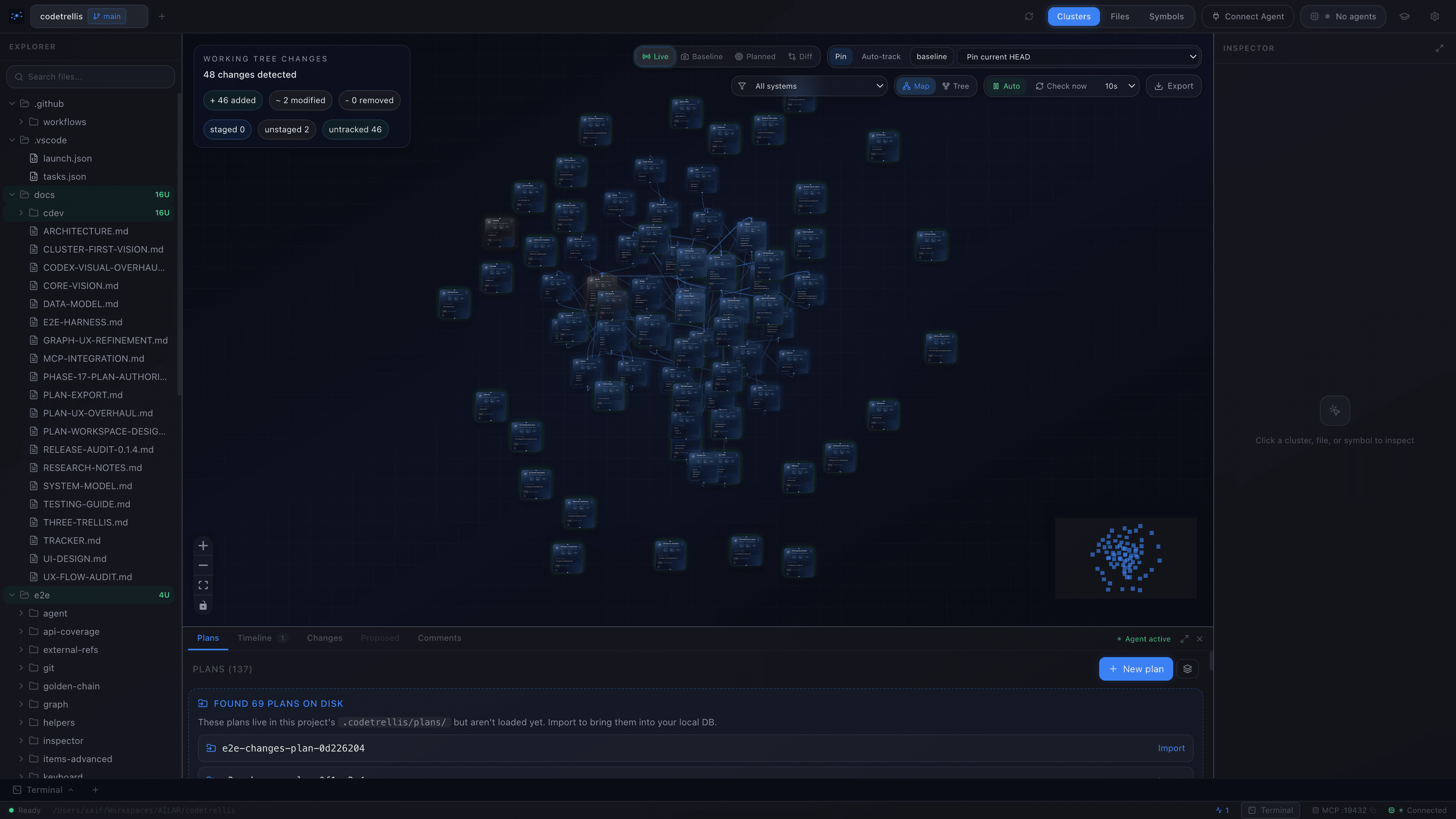
the codebase, mapped
macOS · Windows · Linux
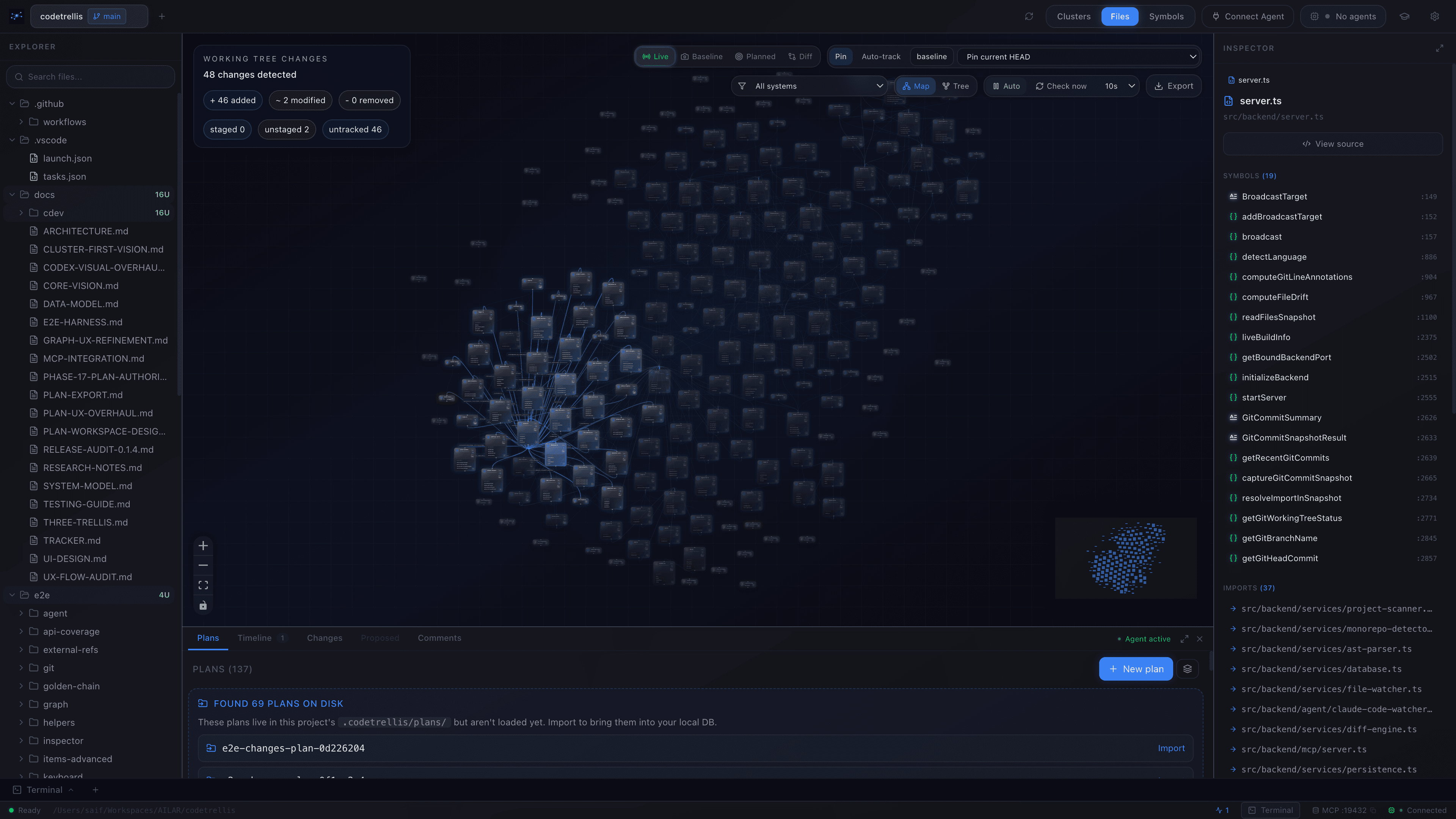
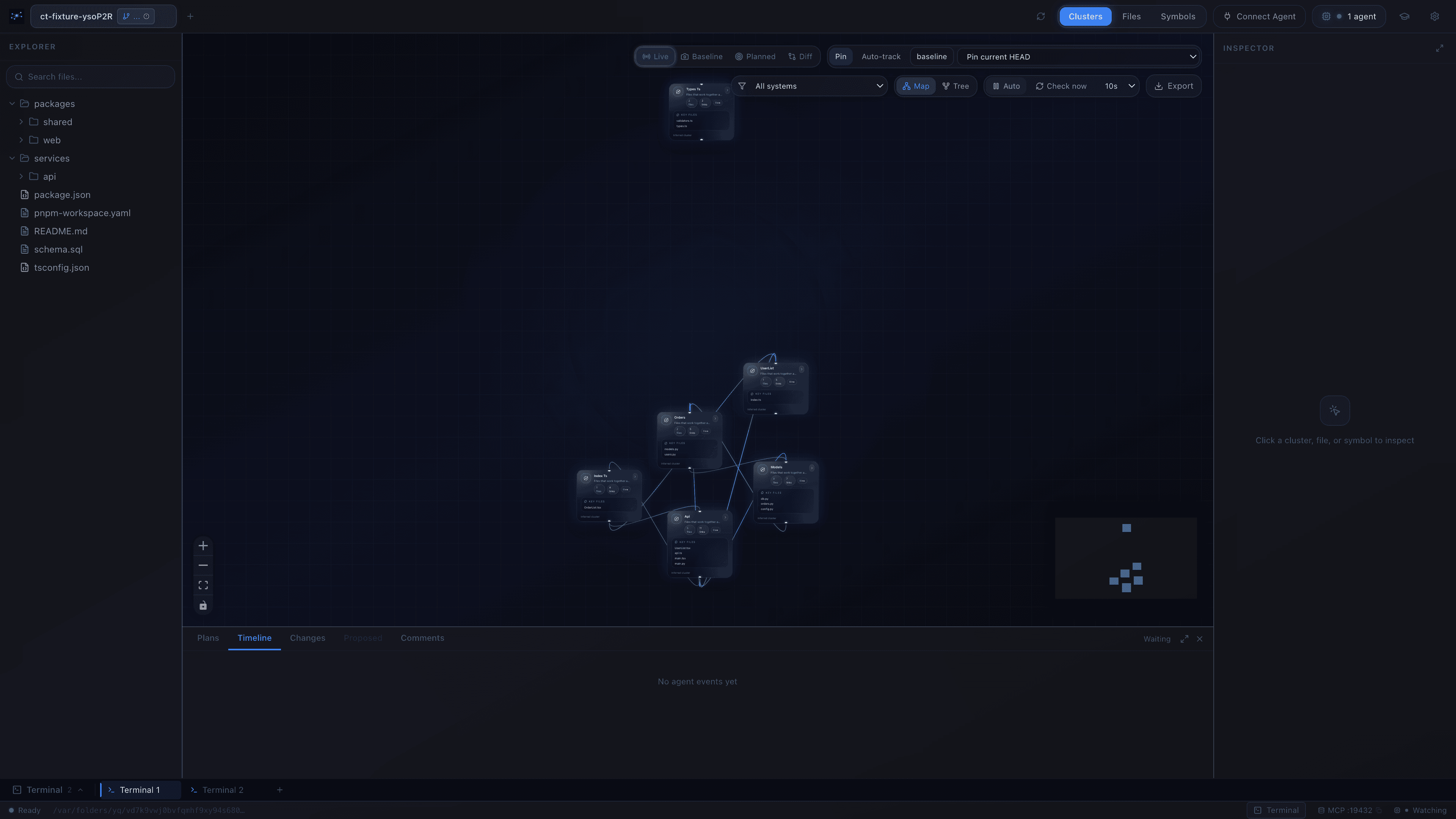
One graph for every language your codebase speaks.
TypeScript, Python, Rust, SQL — same canvas. The cross-language edges aren't a feature bolted on top; they're how the codebase actually talks. CodeTrellis renders them at three depths and lets you descend at will.
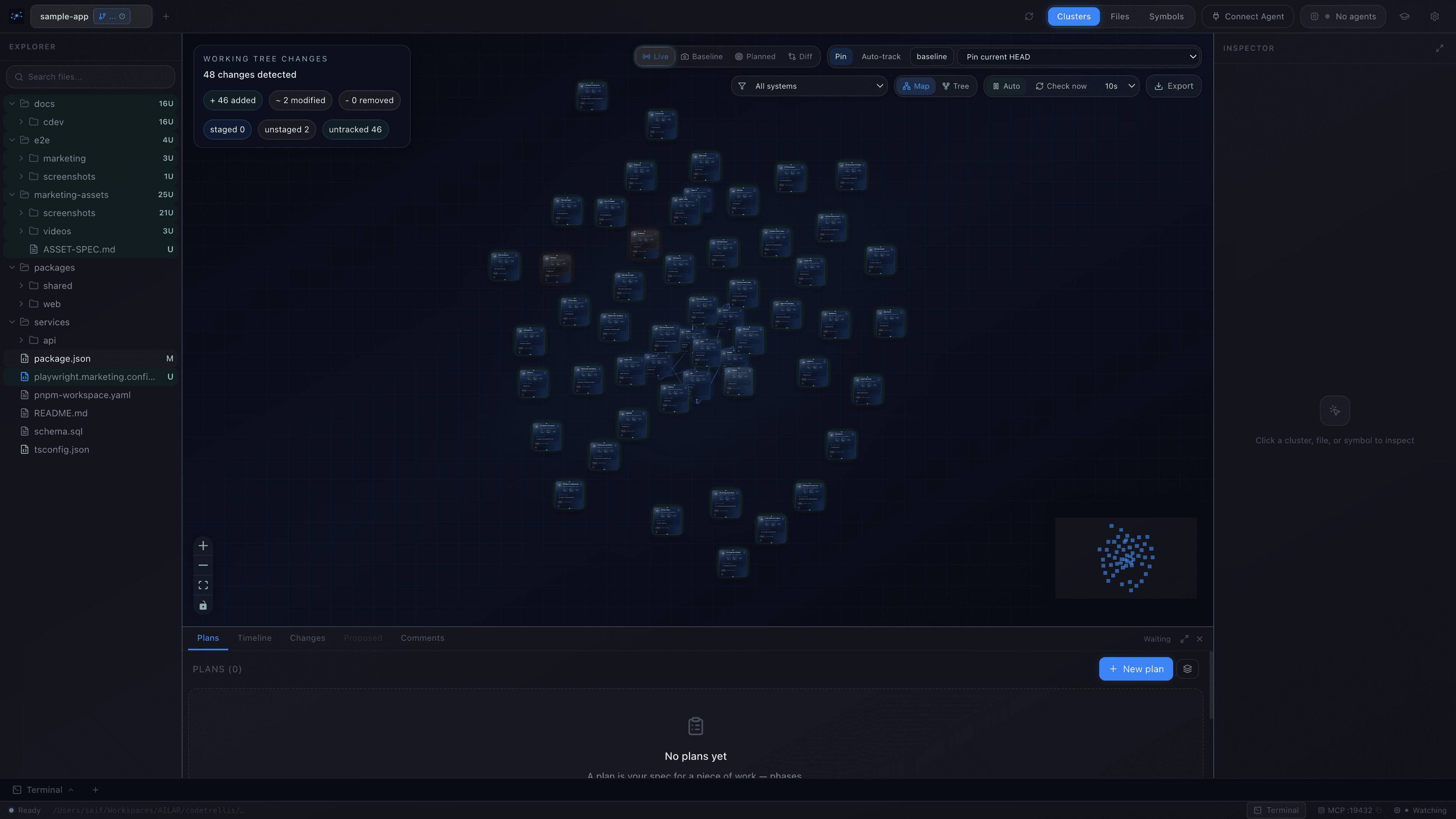
01 / Packages
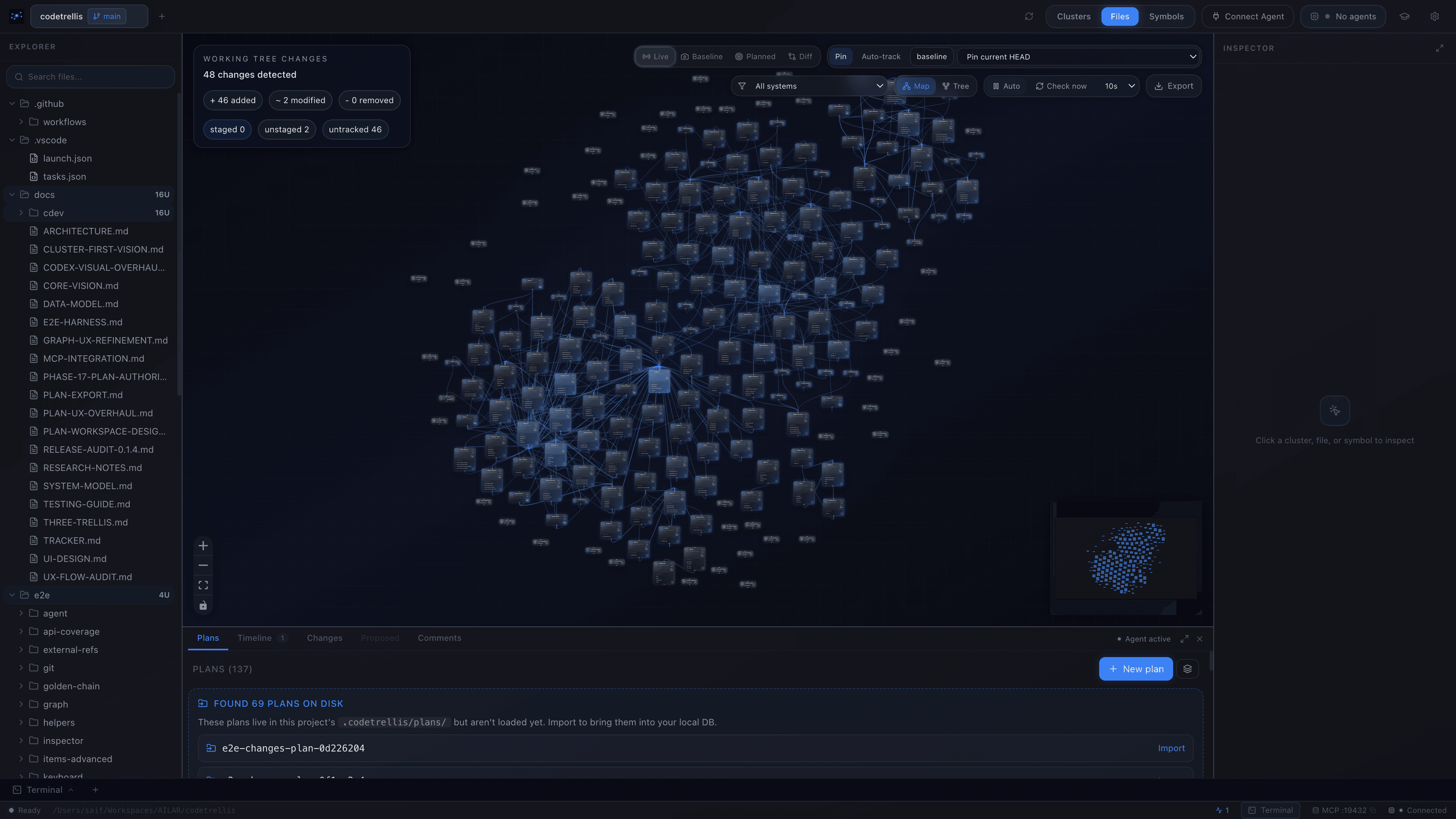
02 / Files
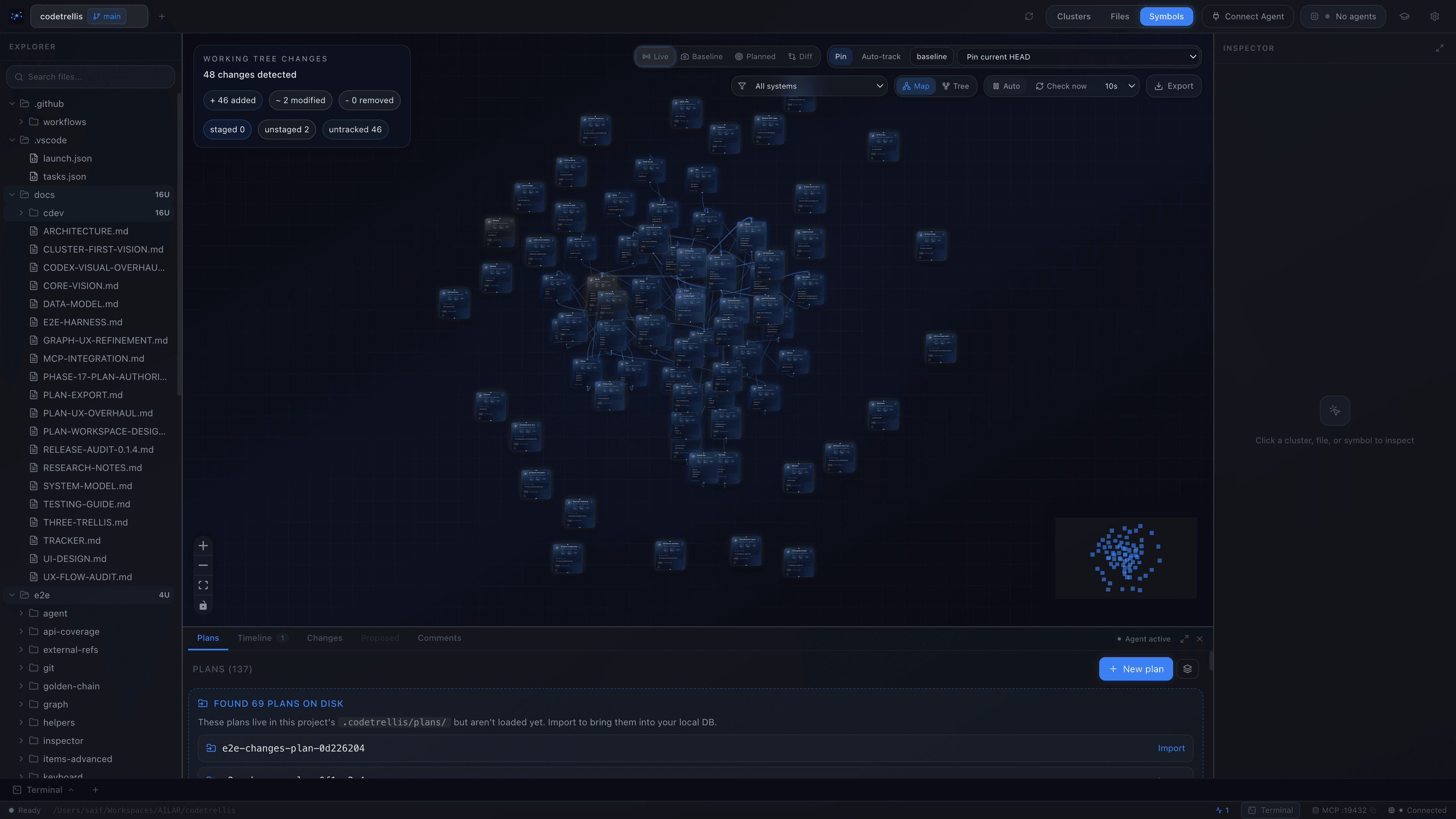
03 / Symbols
Click anything to understand it.
- →Metadata, exports, and imports for the selection
- →Cross-system callers (HTTP, SQL, subprocess)
- →Open in editor with one keystroke
Structure the work before a line is written.
A plan is a typed, structured surface — phases, tasks, spec docs, acceptance criteria. As simple or as deep as the work calls for. Draft it yourself, or hand it to the agent and supervise.
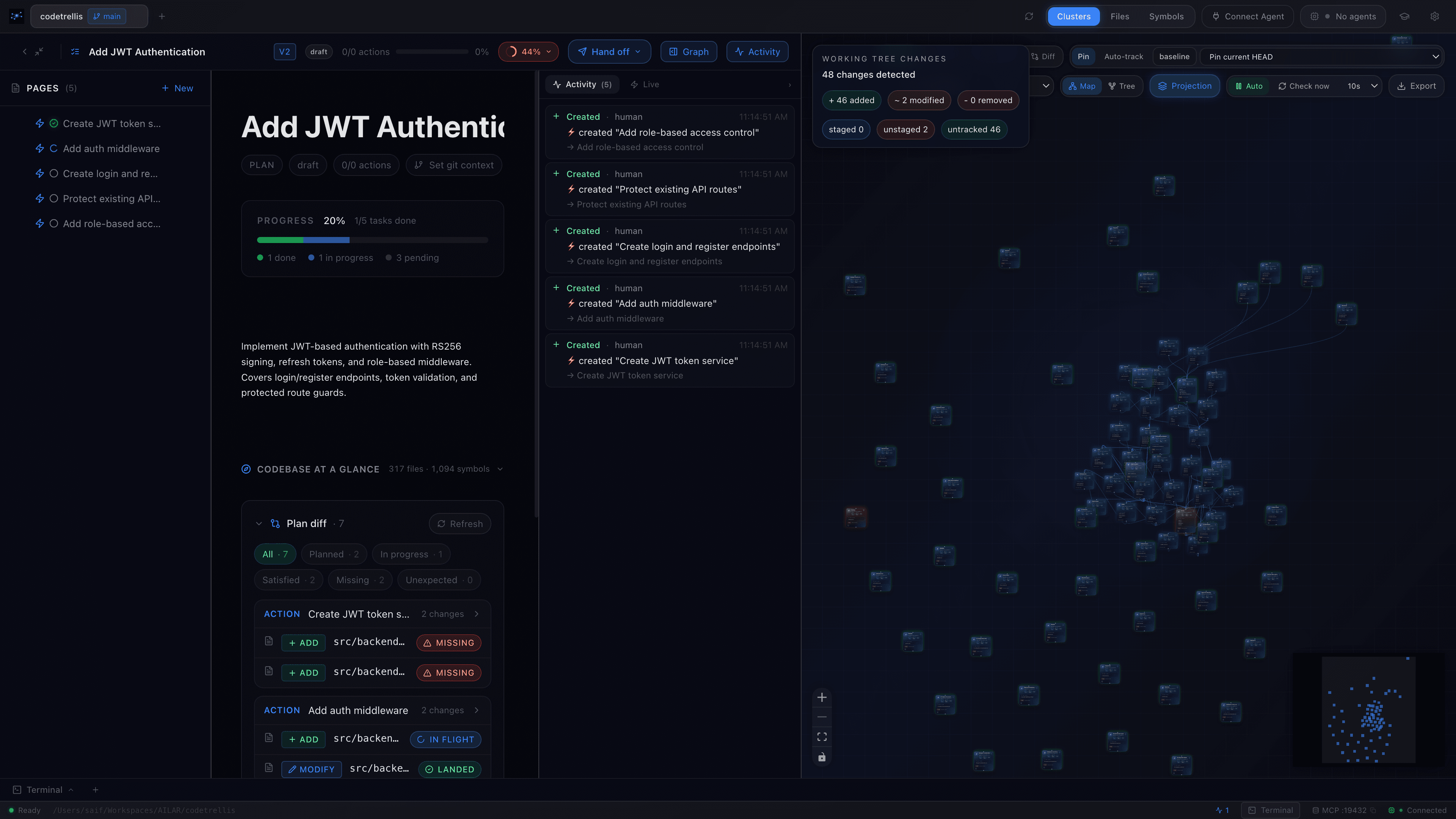
The planning surface.
- →Phases · tasks · acceptance criteria
- →Spec docs round-trip as YAML + markdown
- →Templates: built-in or from your repo
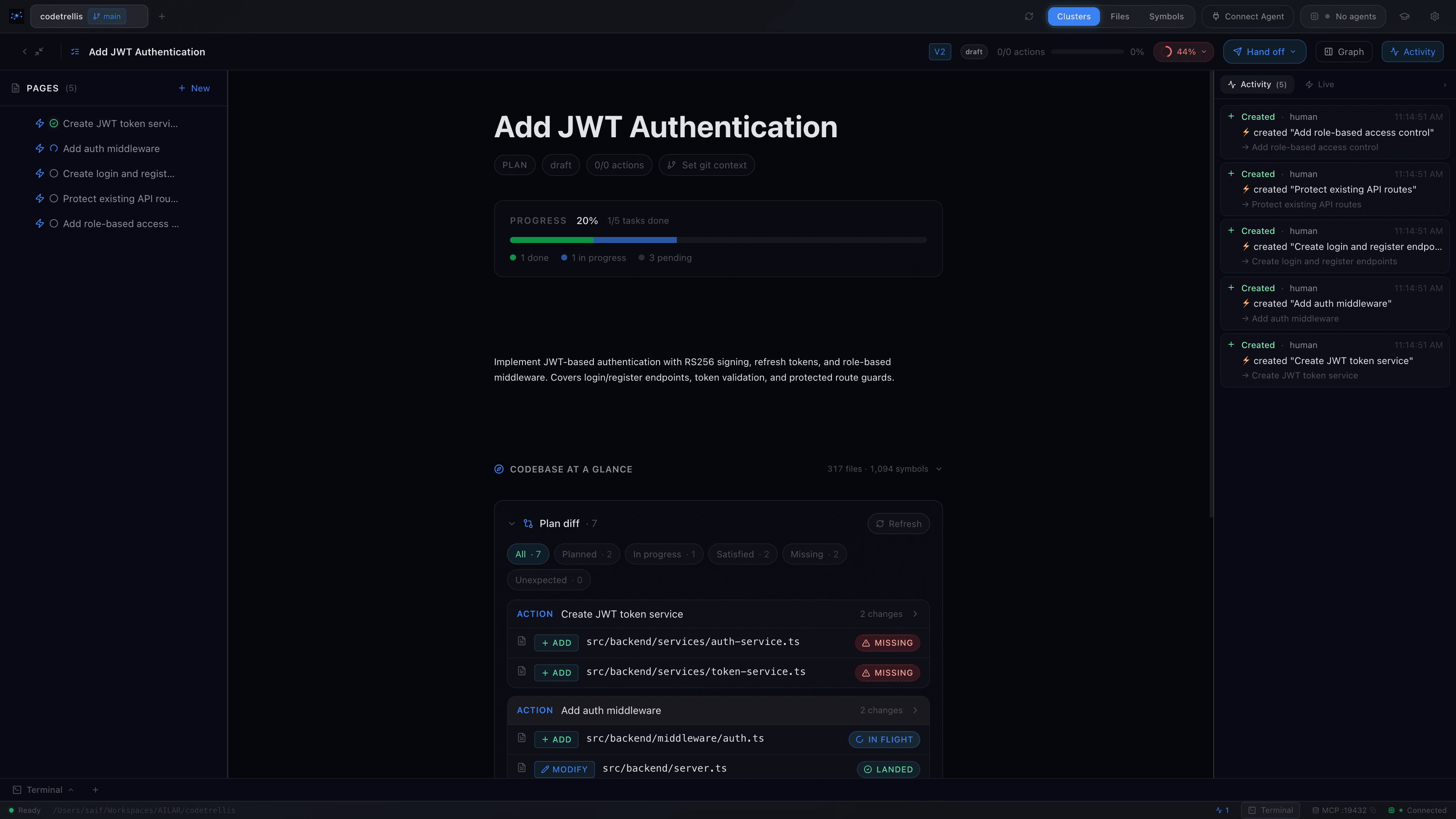
See the impact before it happens.
- →Create vs modify, visually distinct
- →Inspect any planned change in context
- →Re-scope the plan when the projection surprises you
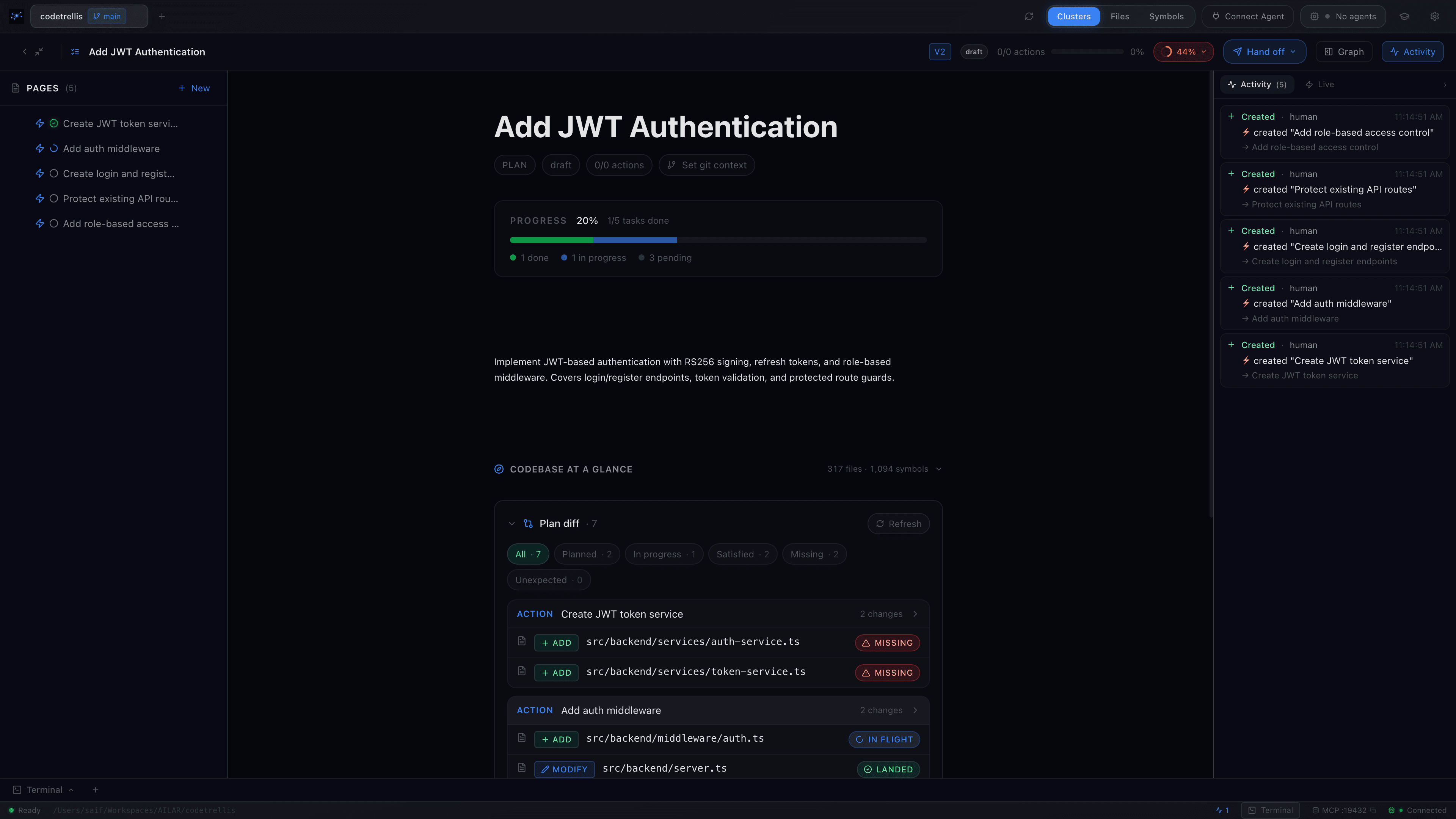
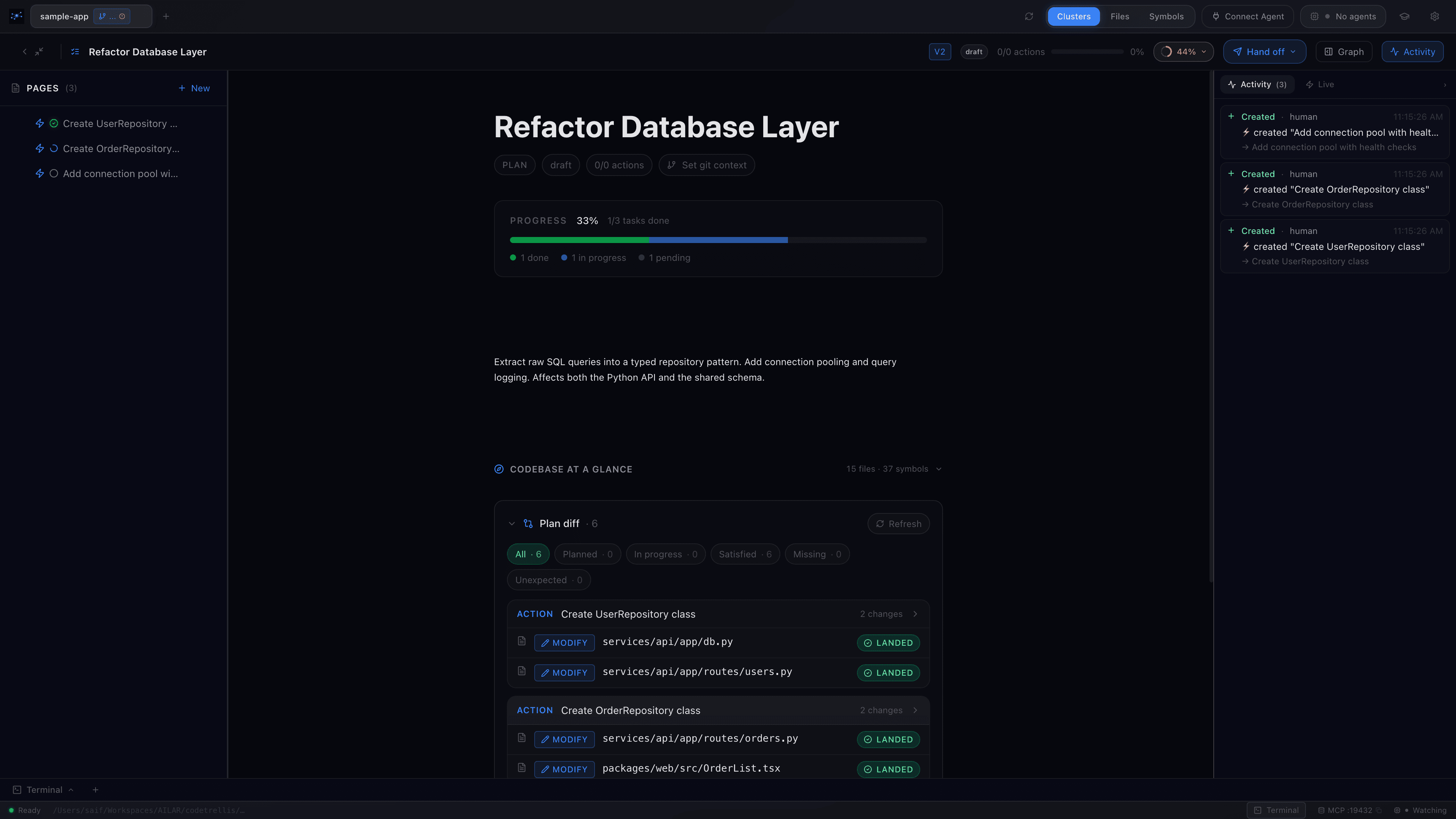
Plans cross boundaries
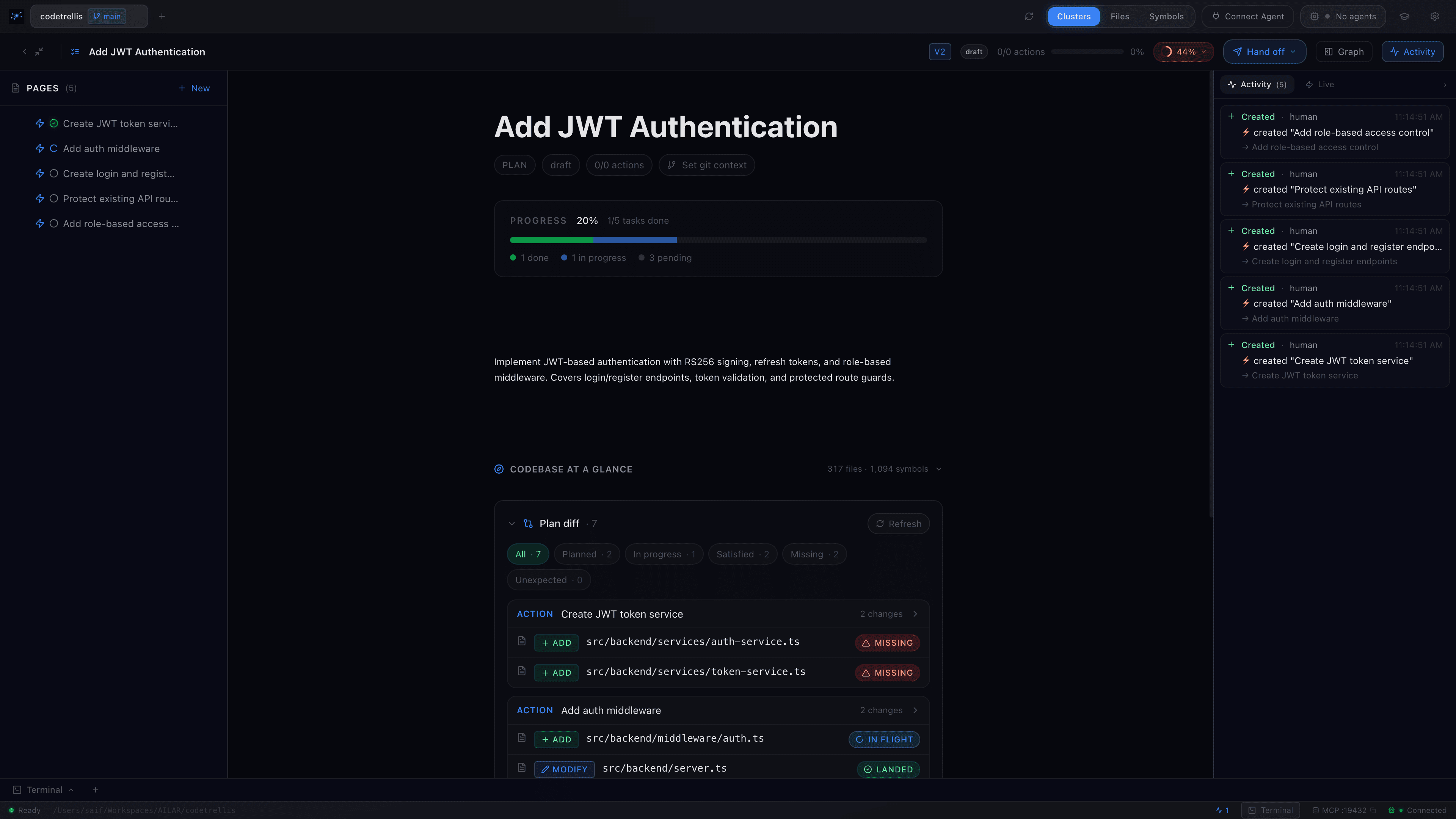
Same surface, both authors
The human can be the trellis, guiding the agent.
Or the agent can be the trellis, guiding the human.
CodeTrellis is the structure both of you grow against.
↔ either direction · same surface
Watch the work happen. Catch the drift the moment it starts.
Plan, graph, terminal, timeline — one surface. The agent executes against the plan, every tool call lands in the timeline, and the working tree streams onto the graph in real time. Drift gets the amber treatment before the blast radius spreads.
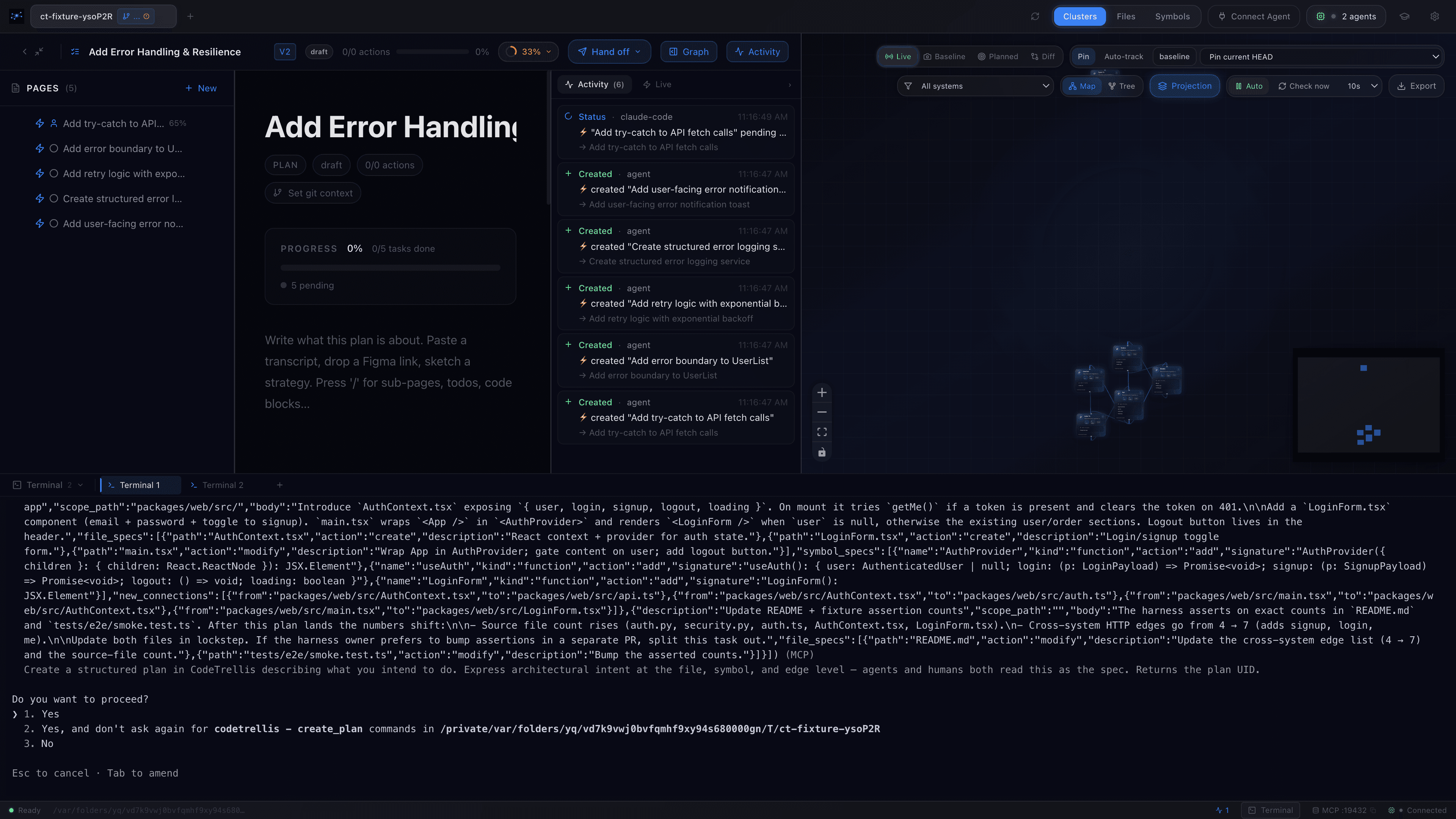
Drift, surfaced the moment it happens.
- →Auto-task progression as planned files change
- →Amber highlight on out-of-plan edits
- →Conformity score, live
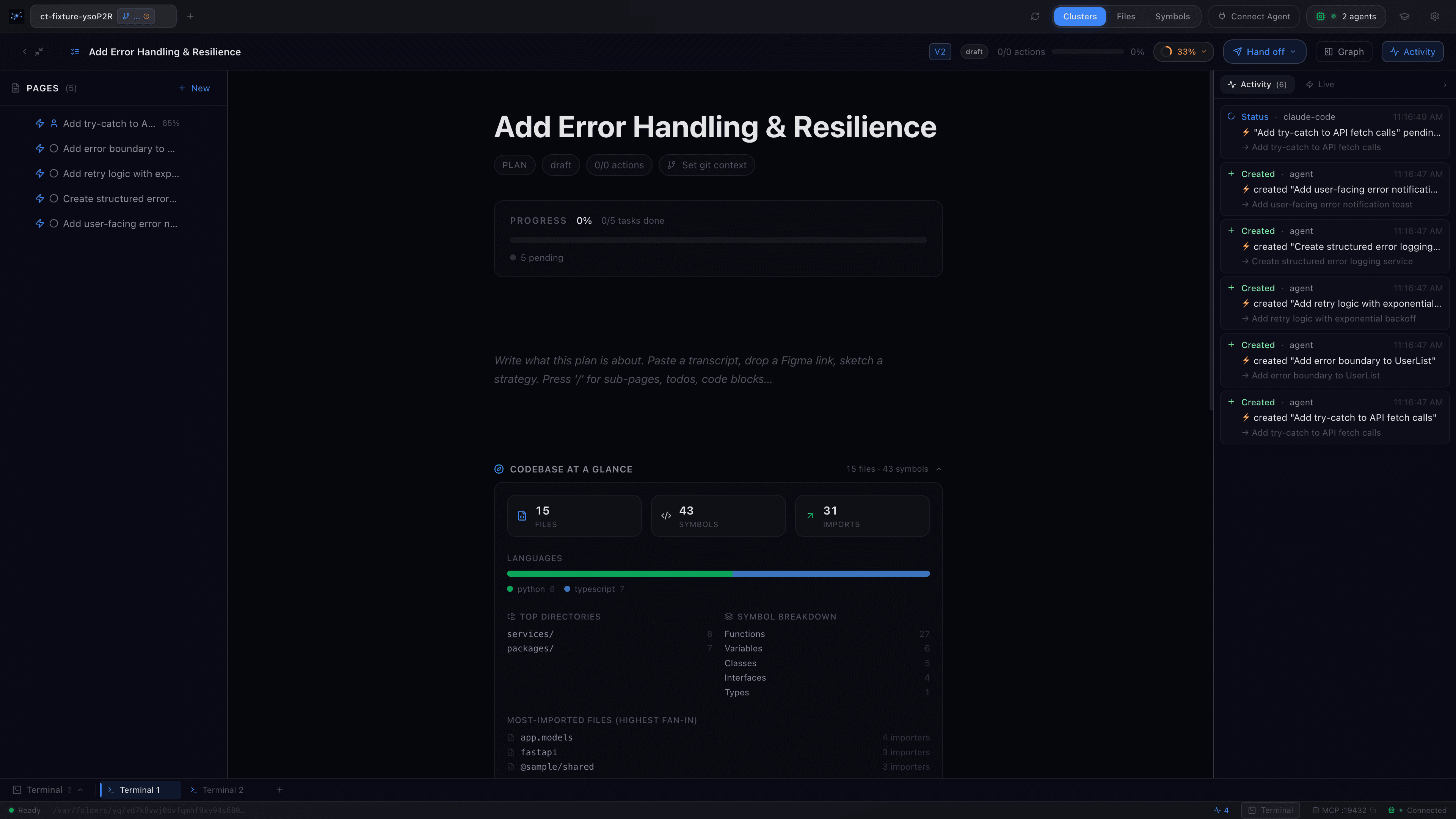
Every action, accounted for.
register_session, create_plan, claim_item, detect_deviations — lands on the timeline, timestamped and attributed to the agent that made it. Replay, audit, or just keep an eye on the loop.- →Per-agent attribution
- →Timeline streams in real time, no polling
- →Export the trail when you need a record
Most agents plan internally and never show their work. CodeTrellis surfaces the plan, the changes, and every tool call as the agent makes them — so you stay in the loop without slowing it down.
Reading the payments plan. 3 phases, 14 tasks. Starting with phase 1 — Stripe wiring.
Created src/payments/checkout.ts. On plan. No drift.
About to touch src/auth/session.ts — that's outside the plan. Should I add it to the scope?
Stripe webhooks: idempotent or queued? You haven't said.
All 9 task files have changes. Marking phase 1 complete.
The agent narrates what it’s doing — so you’re never out of the loop.
A floating Presence Pane where an MCP agent can narrate its work in real time, explain a step, walk you through the architecture, or ask you a question. A subtle pulse glows at the screen edge whenever the agent acts — so you always know what was you and what was the agent.
- Offline voice via the built-in Web Speech API — no API key, no audio leaves your machine.
- Tone-coded cards — neutral, success, warning, question — and a two-way reply box so you can answer without leaving the app.
- Mirrored to mobile. Every Presence card also lands on the companion app — narration follows you off the desk.
Run the agent inside CodeTrellis — or have it run the room.
v0.1.5 brings a built-in terminal that fires up Claude Code, Codex, aider — any CLI agent — without leaving the app. The agent can also drive the UI itself: panning the graph, opening files, walking you through the codebase as it explains it.
Built-in terminal
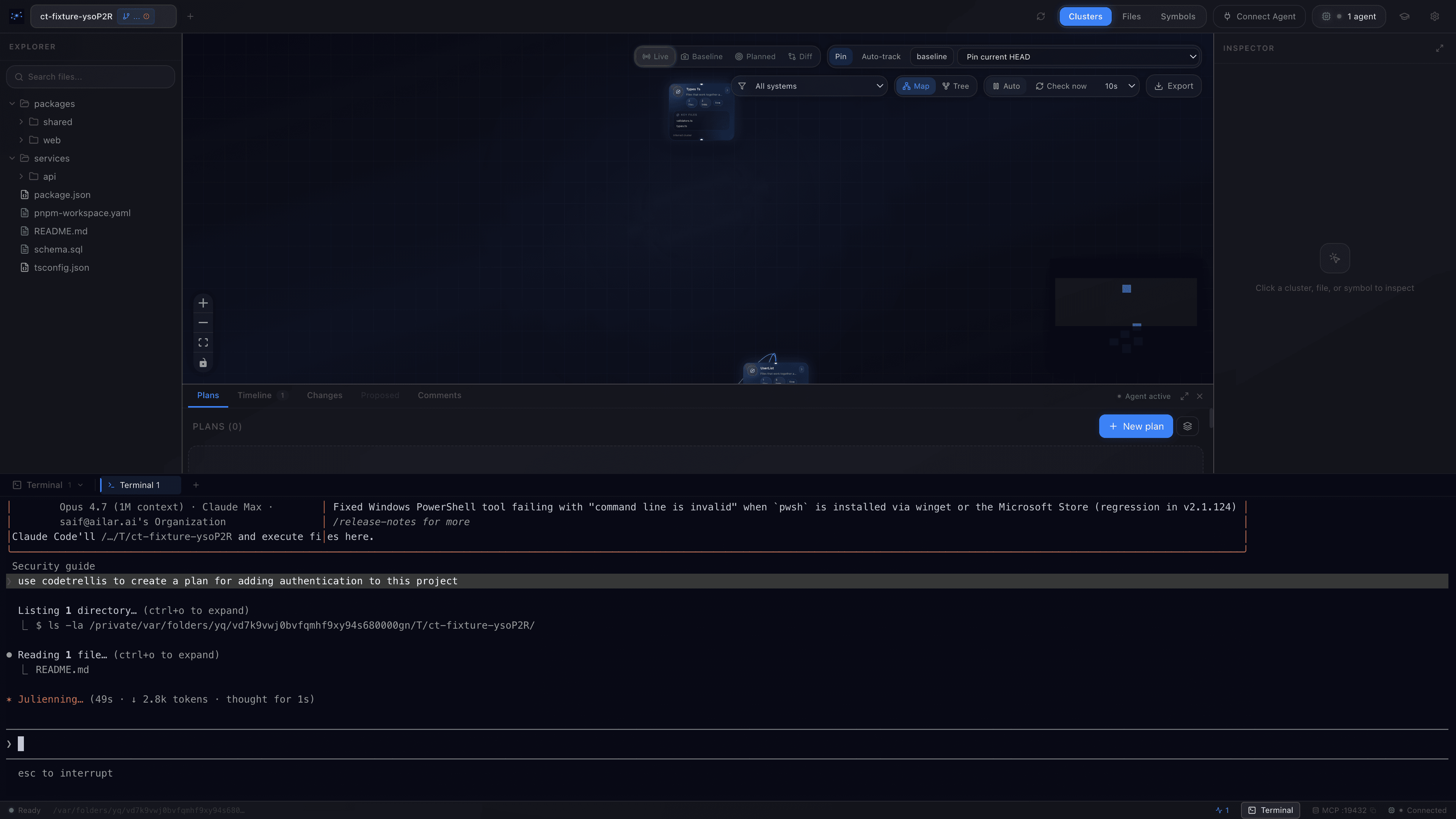
No alt-tab between the app and your terminal. Spawn an agent, watch it work, and stay in the same surface as the plan and the graph.
Agent-built plans, live
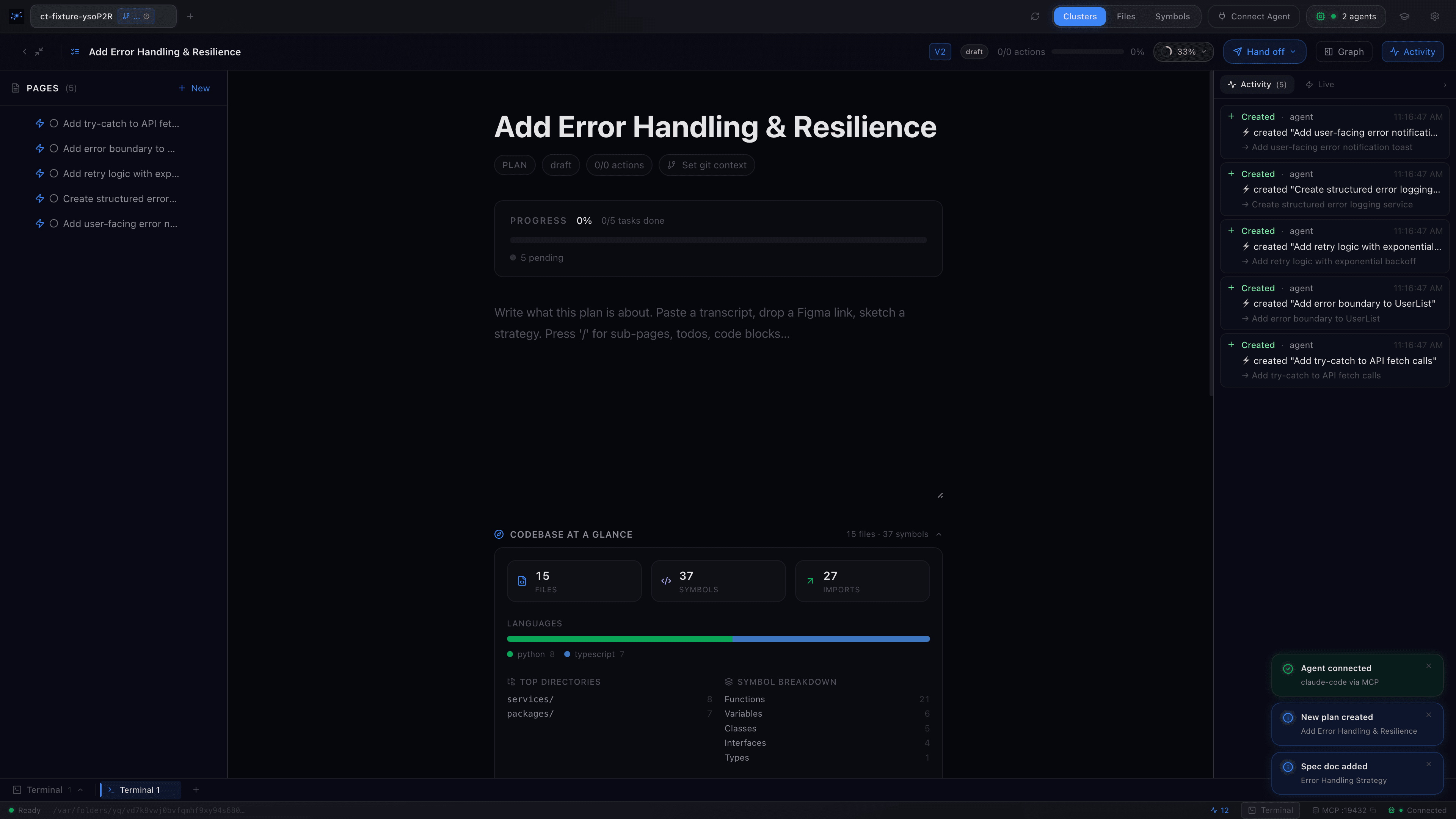
Hand the agent a goal. It creates the plan in front of you — phases, tasks, progress — all surfaced as it thinks, instead of disappearing inside a black box.
Let the agent walk you through the codebase.
Hand control to the agent and watch it pan the graph, open files, and narrate the architecture as it goes. Good for onboarding, code review, or a second read on something unfamiliar.
Humans and agents, same plan, same channel.
A shared plan workspace where teammates and AI agents can coordinate without talking past each other. Channels for every blocker. @-mentions that ping the right human or agent. Claims that prevent two actors stepping on the same file. Presence so you always know who’s holding what.
- →Per-plan channels: stuck · need-context · decision · handing-off · steer · weigh-in
- →@-mention any human or agent on the plan
- →Claims gate items so contention can’t happen
- →Presence rail shows who’s currently on the plan
- →Every event also lands on the mobile companion
- SSaifMaintainer
- AAlexReviewer
- ClaudeSonnet 4.7
- CodexGPT-5
- CursorEditor
- Hand-off@claude
Phase 1 wired. Tests green. Handing payments back to @saif for review before I touch the webhook config.
- Stuck@codex
Stripe metadata field shape — same as v3 webhook payload, or do you want the slimmer one? @alex
- in-progressWire Stripe webhooks
- in-progressRefund flow
- reviewAudit logsA
- openMigration scriptsClaim
- in-progressWebhook testsS
- openIdempotency key storeClaim
You decide how much agency the agent has.
CodeTrellis is useful at every level. You don't have to commit to the whole stack to get value from any of it.
- Stop 01 · 0 agents
Quiet monitor
Open it, scan a codebase, leave it open while you work in your editor. No agent involvement at all.
- Stop 02 · 0 agents
Plan sanity check
Draft a plan yourself. Use the projection to sanity-check the blast radius before you start coding.
- Stop 03 · 1 agent
Agent-assisted
Hand the agent a phase, watch it execute, catch drift the moment it surfaces. You stay in the driver seat.
- Stop 04 · Many agents
Multi-agent
Spin up multiple agents on the same plan, each claiming tasks. Oversight stays in one place.
→ CodeTrellis is useful at every stop on the dial
Drive the desktop from your phone.
Plans, channels, terminals, the live dependency graph — your full CodeTrellis workspace, in your pocket. Pair in one QR scan over your network, drive remotely over a VPN tunnel. Free on iOS and Android.
Full workspace
Plans, items, channels, terminals, graph, system docs — all real-time, all from the phone.
One-QR pairing
Settings → Devices on desktop, scan from phone, done. Auto-reconnect on app foreground.
Streams over WebRTC
Real-time desktop ⇄ phone with no cloud, no signalling server. xterm.js bundled offline.
Agents drive too
mobile_navigate / mobile_screenshot / mobile_present — any MCP agent can pilot the phone.
On your local network
Desktop advertises over mDNS / Bonjour as codetrellis-<id>.local; the phone finds it without typing IPs. No cloud relay, your data never leaves the LAN.
From anywhere · over a VPN tunnel
Use any VPN — Tailscale, Twingate, WireGuard, whatever you already have. CodeTrellis advertises every reachable address; pairings made at home upgrade to the VPN address automatically when you leave.
Works with your favourite AI coding tools.
CodeTrellis exposes your codebase architecture through MCP, so agents and IDEs can inspect structure, dependencies, documentation and engineering context without custom integrations.
- Claude Code
- Windsurf
- VS Code
- Cline
- Continue
- Goose
- Gemini CLI
- Zed
- Amazon Q
- Replit Agent
- Claude Code
- Windsurf
- VS Code
- Cline
- Continue
- Goose
- Gemini CLI
- Zed
- Amazon Q
- Replit Agent
- Cursor
- GitHub Copilot
- OpenAI Codex
- Roo Code
- OpenCode
- Crush
- Qwen Code
- JetBrains AI
- Devin
- Bolt.new
- Cursor
- GitHub Copilot
- OpenAI Codex
- Roo Code
- OpenCode
- Crush
- Qwen Code
- JetBrains AI
- Devin
- Bolt.new
Use it with any model.
CodeTrellis is model-agnostic. Frontier models, open-weights, local runtimes, routed providers — pick the right one for the job, the budget, the privacy bar.
- OpenAI
- Google Gemini
- Meta Llama
- DeepSeek
- xAI
- Together AI
- DeepInfra
- OpenRouter
- LM Studio
- LiteLLM
- LocalAI
- OpenAI
- Google Gemini
- Meta Llama
- DeepSeek
- xAI
- Together AI
- DeepInfra
- OpenRouter
- LM Studio
- LiteLLM
- LocalAI
- Anthropic
- Mistral AI
- Qwen
- Cohere
- Groq
- Fireworks AI
- Hugging Face
- Ollama
- vLLM
- llama.cpp
- Replicate
- Anthropic
- Mistral AI
- Qwen
- Cohere
- Groq
- Fireworks AI
- Hugging Face
- Ollama
- vLLM
- llama.cpp
- Replicate
MCP-native. Model-agnostic. Built for the open agent ecosystem.
Patterns that emerged after a month of daily use.
Notes from the maintainer. Likely incomplete — drop me a line if you find a sixth.
- 🔁01
Re-run with a different agent
Run the plan with Claude, swap to Codex, see who lands it cleaner.
- 🧩02
Split work across agents
Best tool per job. Work around per-agent usage limits.
- 🔄03
Context refresh
When an agent's context thrashes, clear it and have it re-ingest the plan from MCP.
Open source. Local first.
Two facts about how the app works, not promises about what it won't do. Read the code, run it on your own machine, and verify the rest for yourself.
- Apache 2.0 · source coming
Open source.
Apache 2.0. The source isn't open yet — we're collecting feedback first, then it goes up. Public releases and per-version notes live on GitHub today.
See releases on GitHub - Runs locally
Local first.
Scans your repo on disk. Writes to a local SQLite. Runs a local MCP server. No telemetry. No cloud. No data leaves the machine.
- Your AI bill stays your AI bill
Your AI cost, unchanged.
Compute lives inside your agent — CodeTrellis is a tool it calls via MCP. No second subscription. No per-seat fees. No surprise bills.
Required: git, plus an MCP-capable AI agent for the AI features. The app works fine without one if you're authoring plans by hand.
Built for the people who have to answer for what the agent did.
- Full audit trail of every action — human or agent.
- Runs locally. No data leaves the machine.
- Every tool call attributed, timestamped, exportable.
Pick the build for your machine.
CodeTrellis v0.1.13
CodeTrellis-0.1.13-arm64.dmg · 125 MB
Free · Apache 2.0 · macOS now signed & notarized
Desktop
10 builds| Platform | File | Size | |
|---|---|---|---|
macOS · Apple SiliconSigned & notarized | CodeTrellis-0.1.13-arm64.dmg | 125 MB | Get |
macOS · IntelSigned & notarized | CodeTrellis-0.1.13-x64.dmg | 132 MB | Get |
Windows · InstallerNSIS installer | CodeTrellis-Setup-0.1.13.exe | 100 MB | Get |
Windows · PortableSingle executable, no install | CodeTrellis-Portable-0.1.13.exe | 100 MB | Get |
Linux · AppImage (x64)Runs on every distro | CodeTrellis-0.1.13-x86_64.AppImage | 132 MB | Get |
Linux · AppImage (arm64)Runs on every distro | CodeTrellis-0.1.13-arm64.AppImage | 132 MB | Get |
Linux · .deb (x64)Debian / Ubuntu | codetrellis_0.1.13_amd64.deb | 100 MB | Get |
Linux · .deb (arm64)Debian / Ubuntu | codetrellis_0.1.13_arm64.deb | 99 MB | Get |
Linux · .rpm (x64)Fedora / RHEL | codetrellis-0.1.13.x86_64.rpm | 87 MB | Get |
Linux · .rpm (arm64)Fedora / RHEL | codetrellis-0.1.13.aarch64.rpm | 85 MB | Get |
Mobile companion
2 buildsPair with the desktop in one QR scan. Drive plans, channels, terminals, and the graph from your phone.
Releases hosted on github.com/lionroseway/codetrellis-releases.
Source, soon
“The source isn’t open yet — I’m collecting feedback first to sharpen the rough edges. Bug reports, missing use cases, plan templates you wish were built in — I’d love to hear them.”